
Forms, redesigned. Charting, transformed.
Forms, redesigned. Charting, transformed.
Today BodySite ships the largest update to forms in the platform’s history. Forms have been rebuilt with a new front-page entry point, colored folders, list view, and per-form actions. Our Form Templates have been refreshed with a new generation of templates that capture structured biometric and demographic data. And — most importantly — every form in your library is now a first-class object in charting, so you can build an encounter note around a structured intake the patient already completed or a structured form from your library.
This release closes a gap that’s been open for a long time. Here’s everything that’s changed, why, and what you should do today.
What’s launching
Three things ship simultaneously this morning, and they’re designed to be used together:
The Forms Library has a new entry point, a new folder system, and a redesigned form-level workflow. Finding, organizing, and editing forms is now super easy — especially if you maintain a large library.
Charting With Forms turns every form template in your library into something you can chart with. This is the workflow we’ve been quietly developing for months and have intentionally held back from broad announcement until the rest of the forms experience was ready to support it.
The 2026 Form Templates Library rolls out as a complete refresh of the form templates BodySite provides, including charting templates. Templates have been rebuilt to leverage structured biometric and demographic capture into the patient record and refreshed from top to bottom. They are all live today as copy-able templates — and at the same moment, direct assignment of BodySite-owned forms to patients is retired, bringing forms in line with how Plans have always worked: copy first, then assign.
The new Forms Library
For most providers, this is the visible change. It starts on the front page.
A front-door shortcut
Until today, the Forms area was tucked inside the Content top navigation tab — an awkward route for what is, for many practices, a daily workflow. As of this release, a new Forms button sits under Quick Tools on the front page. One click and you’re in.
Folders that match how clinicians think
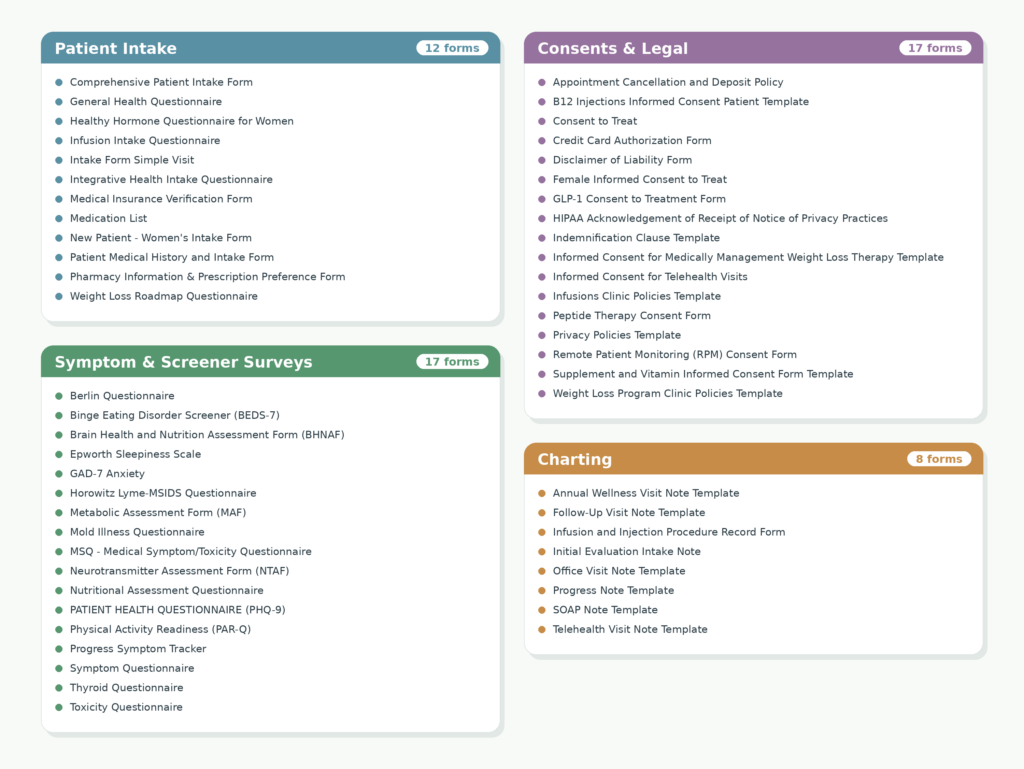
BodySite’s Form Templates library opens to a folder view organized by clinical purpose. When you copy a form from any of these folders, you’ll get the same default taxonomy which include:
- Patient Intake — the forms you assign before or at the start of care.
- Symptom & Screener Surveys — validated instruments and recurring assessments.
- Consents & Legal — informed consent, financial agreements, releases.
- Charting Forms — templates designed to be used by the provider during an encounter in their chart.

A fifth Show All option displays every form regardless of category, and a List View toggle gives you a dense, sortable layout when you want to scan the library by name rather than by folder.
Per-form actions and multi-folder placement
Once copied into your library of forms, each form will have a quick menu — visible in both folder and list view — with the actions you’d expect plus one brand new: Move to Folder. You can move a form to a different folder or store it in two places. For example, a Consent form that may also be used as part of patient intake can live in both places. A Screener you reuse across two distinct workflows can appear in two folders without duplication.
Folder assignment is also now part of the form itself. Open a form for editing and you’ll find a setting that controls which folder (or folders) it appears in.
Bringing BodySite template forms into your library
When you copy a form out of the BodySite template forms library, it arrives in your My Forms tab inside a folder of the same name. Copy a consent form and a Consents & Legal folder appears in your account; copy a screener and a Symptom & Screener Surveys folder appears.
You’re not locked into that structure. You can:
- Rename any auto-created folder to whatever you’d prefer to call it.
- Delete a folder after moving its contents elsewhere.
- Create your own folders from scratch using the + New Folder icon.
If you later copy another consent form from the Coach Library, the Consents & Legal folder will be created again — because that’s the form’s denomination — and you can move the new form into your renamed folder and delete the re-created one. The net effect: you can accept the default taxonomy, override it completely, or build a hybrid. You’re in control of how your library is shaped.
Charting With Forms
This is the bigger story.
For years, charting in BodySite has evolved in deliberate steps. Each step added a new way to start an encounter note that fit a different clinical moment:
Two new ways to start a note
1. Chart with a blank form. Pick any template from your Forms Library and bring it into a new encounter note. Fill it out during the visit. The form sits inside the note as a structured object and the note can include anything else you’d add: free text, additional forms, results, plans. When you’re done, save the note and, if appropriate, sign and close. If you copy any of BodySite’s charting templates or create your own inside a “Charting” folder, those will default to the top of the list when creating a new note in a patient’s chart. (and sharing notes with patients is coming soon)
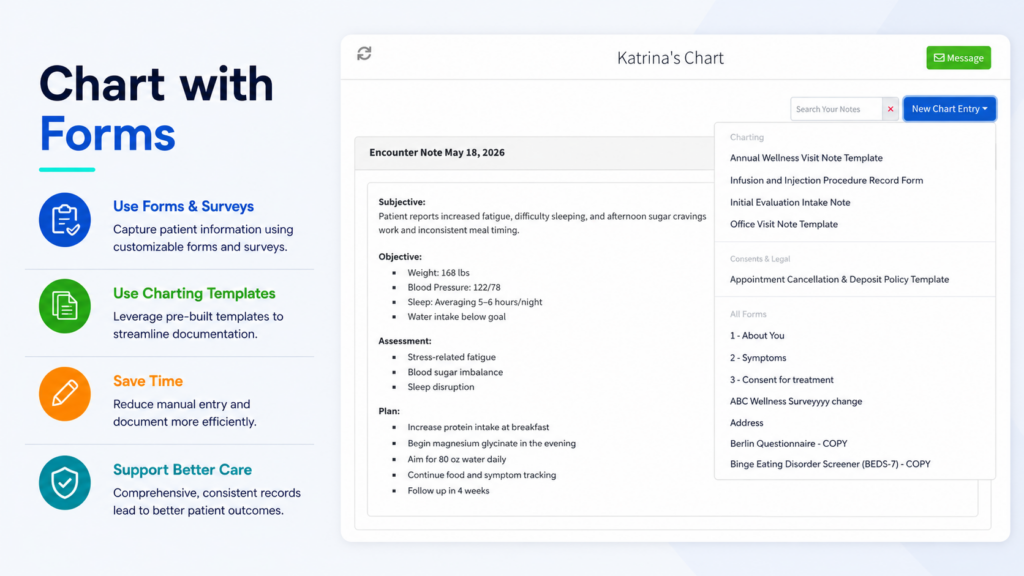
2. Start an encounter from a patient-completed form. When you’ve assigned an intake form ahead of a visit and the patient has filled it out, you can pull that completed form into a new encounter note as the formative object of the note. The note builds outward from the structured answers the patient already gave you. You’re not retyping intake; you’re charting against it. And you can add your own internal note to every answer the patient provided.
In either path, the same fundamental thing is true: the form lives inside the encounter note as one of potentially several objects. The chart is no longer just text — it can be structured intake, structured assessment, and structured documentation, captured and stored in the right place from the start.
Why this matters
The clinical encounter has always been a moment of structured questioning, but the chart has rarely matched it. Free text is forgiving but extra work. Templated text is efficient but unstructured.
Charting With Forms gives the encounter note a structured spine — one you (or your patient) created intentionally — without giving up the flexibility of the rest of the note. It’s the missing link between the forms work you’ve always done outside the chart and the documentation that happens inside it.
The 2026 Form Templates Library
Every form template BodySite provides has been rebuilt for this release, and they went live this morning as copyable templates under Form Templates, listed by folder.
The biggest improvement isn’t cosmetic. The old form templates didn’t take advantage of the platform’s ability to store biometrics and demographics in the database — so any form question about height, weight, age, or similar data ended up as a flat field in the resulting PDF. The data lived in the document, not in the patient record.
The new 2026 templates fix that. When a patient (or provider) answers a question that maps to a structured field, the answer is captured as structured data in the patient’s chart, not as PDF text. Trends become possible. Searches become meaningful. The forms you assign actually contribute to the patient’s record rather than sitting next to it.
If you’ve been hesitant to lean on our templates because they didn’t capture what you needed cleanly, this is the release that changes that. Take another look.
And if you don’t see a form you need, send it to us and we’ll build it for you.
A more consistent forms workflow
Alongside the new templates, this release retires an older capability: providers can no longer assign forms still owned by the BodySite Library directly to patients. To use a BodySite template form, you will need to copy it into your own Forms Library first then you’ll be able to assign it to patients.
This is the same pattern you’ve used with Plans for years. It exists in forms now for the same reasons: clarity of ownership and predictability of behavior.
Why everything ships together
To retire direct assignment of BodySite-owned forms responsibly, two things had to happen on the same day:
- Providers no longer have the ability to assign a BodySite-owned form to a patient.
- The new 2026 versions of every template form go live as copyable templates.
If we’d done either one without the other, you would be stuck with templates that didn’t capture data properly. Doing both simultaneously is what makes this a clean transition rather than a regression.
What to expect
If you’ve previously enrolled a patient and assigned a BodySite-owned form during enrollment — or assigned one from a patient record — that exact action is no longer available but any form that was previously completed is still intact. The form you’re looking for is available, as a NEW template you can copy into your Forms Library under Form Templates. The copied version is, in nearly every case, in better shape than the version you remember.
Our support team is briefed on this transition. If you hit a specific form or workflow you can’t find, reach out and we’ll walk you through it.
For new providers
If you’ve created a BodySite account recently — or you’re evaluating one now — the front page also looks different today. A new onboarding card invites you to start building your forms library as one of the first things you do, alongside the existing cards for Patient Plans and Telemedicine.
The ordering is deliberate. Forms are how patients arrive at a visit ready to be seen, how you capture intake without typing, and — as of today — how you chart. Setting up your forms library on day one makes everything downstream easier.
For new providers, the recommended path is short: open the new Forms from the Quick Tools button right on the front page, browse the templates in the form templates view, bring the ones you need into your library, and try Charting With Forms on your next encounter.
What to do today
This release pulls together a year of work on forms and a longer arc of work on charting. We’re glad it’s finally in your hands.
— The BodySite Product Team